Run a free audit

Find the bugs you never wrote a test for.

Gremlin mode turns an LLM-backed agent loose on your app as a deliberately difficult user — and plain code grades what breaks. No script to write, no path to choose. Pick a persona, point it at a public URL, and watch the agent explore and report the failures it trips over.

Free 8-step teaser, no signup, no card. Dry-run by default — the agent can never write to your data. Paid workspaces authorize staging writes from the dashboard.

critical One impatient double-click, two checkout charges ✓ verified

gremlin.mutation.duplicate · 2× POST /checkout · no idempotency key

An impatient persona double-clicked 'Pay'. Two identical charge requests left the page and nothing collapsed them — in a live run that's a double charge and a refund ticket. The dry-run guard blocked both before they fired. A scripted test clicks once and never reaches this.

The kind of race a script never reaches — only a difficult user does.

How chaos testing works in Prufa

A normal flow checks a path you already know to check. Gremlin is for the paths you didn't. The split that makes it trustworthy: the model decides where to poke, plain code decides what counts as broken.

The agent misbehaves in character

Pick a persona — a confused newbie, an impatient double-clicker, a fat-finger typist, a back-button masher, a hostile poker — and the agent drives a real browser as that user, choosing its own next action every step. It feeds junk into forms, mashes controls, and wanders into pages you forgot existed. An exploration frontier keeps it covering the whole app instead of looping one corner.

Plain code keeps the score

The LLM never decides whether anything broke — that is the same invariant as the rest of Prufa: the LLM navigates, plain code verifies. Deterministic detectors grade the run, so a finding survives because of recorded evidence, not a model's say-so. Anything the model merely suspects ships in a separate advisory tier, labelled as opinion and never graded as a fact.

What Gremlin catches

These are screenshots of a real Gremlin report — the same one a run hands back. Every finding below is a plain-code fact read off the live page, not the model's opinion.

It tells you what broke — ranked and verified

Every run opens with the highest-value bug, not a wall of logs: severity first, then product impact across auth, signup, checkout, forms, dead ends, mobile layout, console, and network breakage. The report shows the strongest finding as a hero with evidence, keeps only the next two verified findings expanded, and groups the rest so triage starts where it matters.
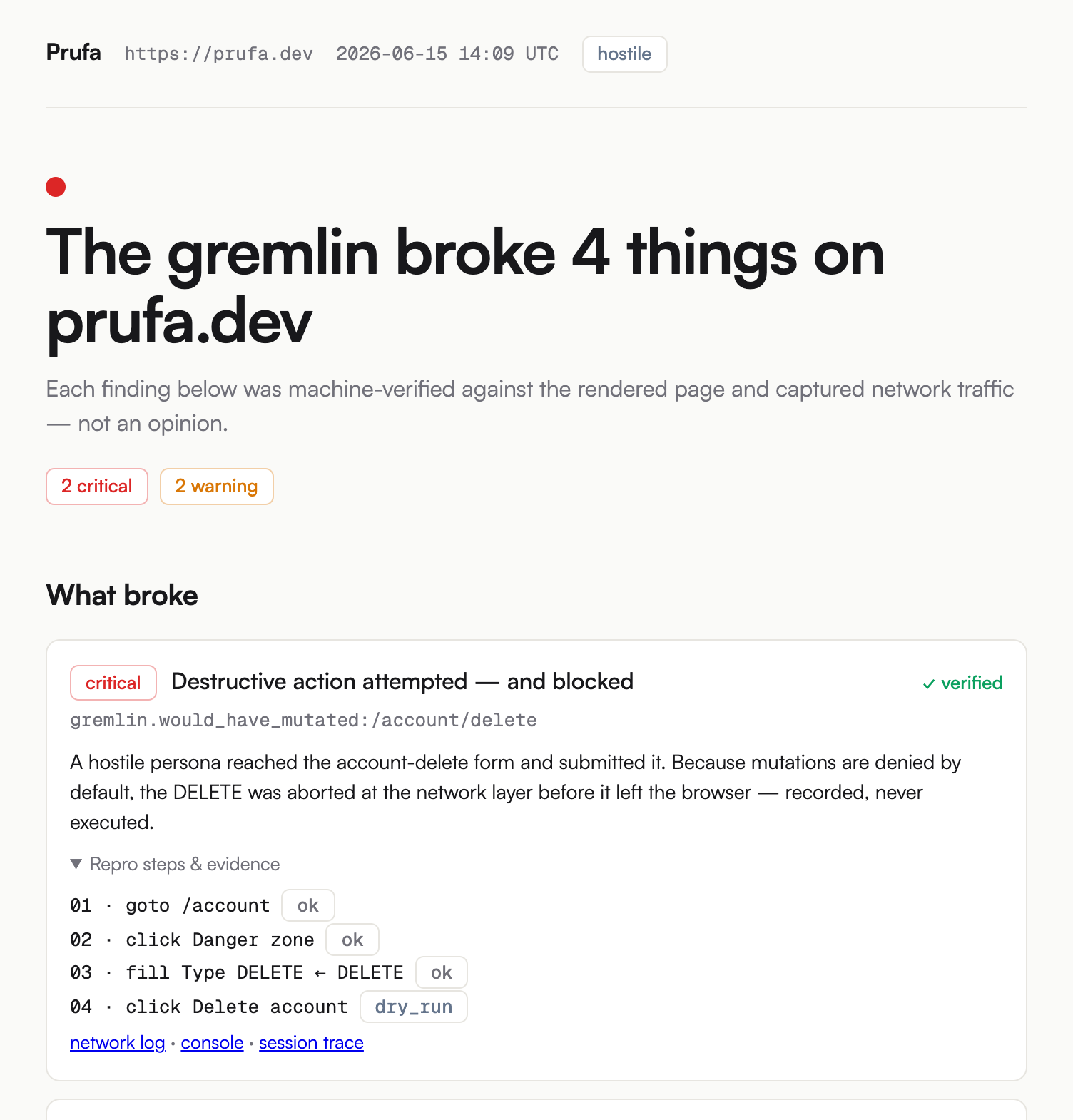
Top of a Gremlin report for prufa.dev: a red verdict headline, severity count chips, and a most valuable finding hero with mono finding key, evidence, and repro steps
The verdict, then the most valuable bug — severity-ranked, product-impact sorted, and verified against the rendered page.
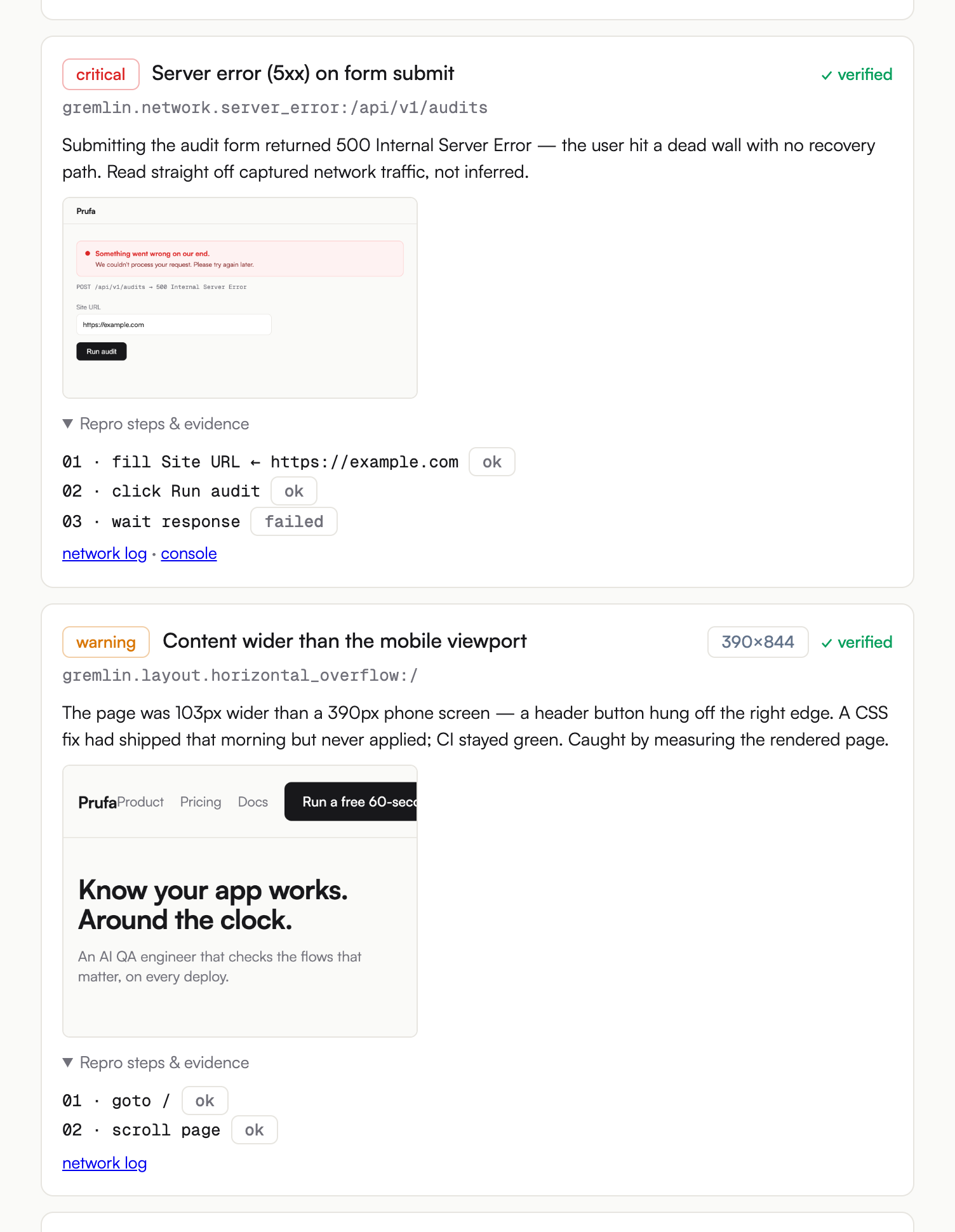
Two Gremlin finding cards with captured evidence: a critical 500-on-submit finding showing the actual error banner screenshot and a three-step repro, and a warning mobile-overflow finding showing the phone screenshot where a header button hangs off the right edge
A finding survives on recorded proof — the captured screenshot, the repro steps, and the network and console logs behind it.

Every finding carries its own evidence

A finding survives because of recorded proof, not a model's say-so: the screenshot captured at the moment it broke, the exact steps to reproduce it, and the network and console logs behind them.

Thresholds are tuned conservatively on purpose — a slow-but-valid spinner, an intentional empty state, or an expected validation error must not mint a verified finding. We hardened that policy after our own run surfaced two false positives — the honest write-up is here.

Every walk can become a regression flow

The gremlin records every path it walks, persona and all. When one reproduces a real bug, import that walk as a reviewable draft flow so the bug can never come back unnoticed — the bridge to Prufa's flows. The draft opens in the dashboard for review before it can run. Destructive steps collapse into one protected-actions block: suppressed, counted, and never executed unless you authorize the domain.
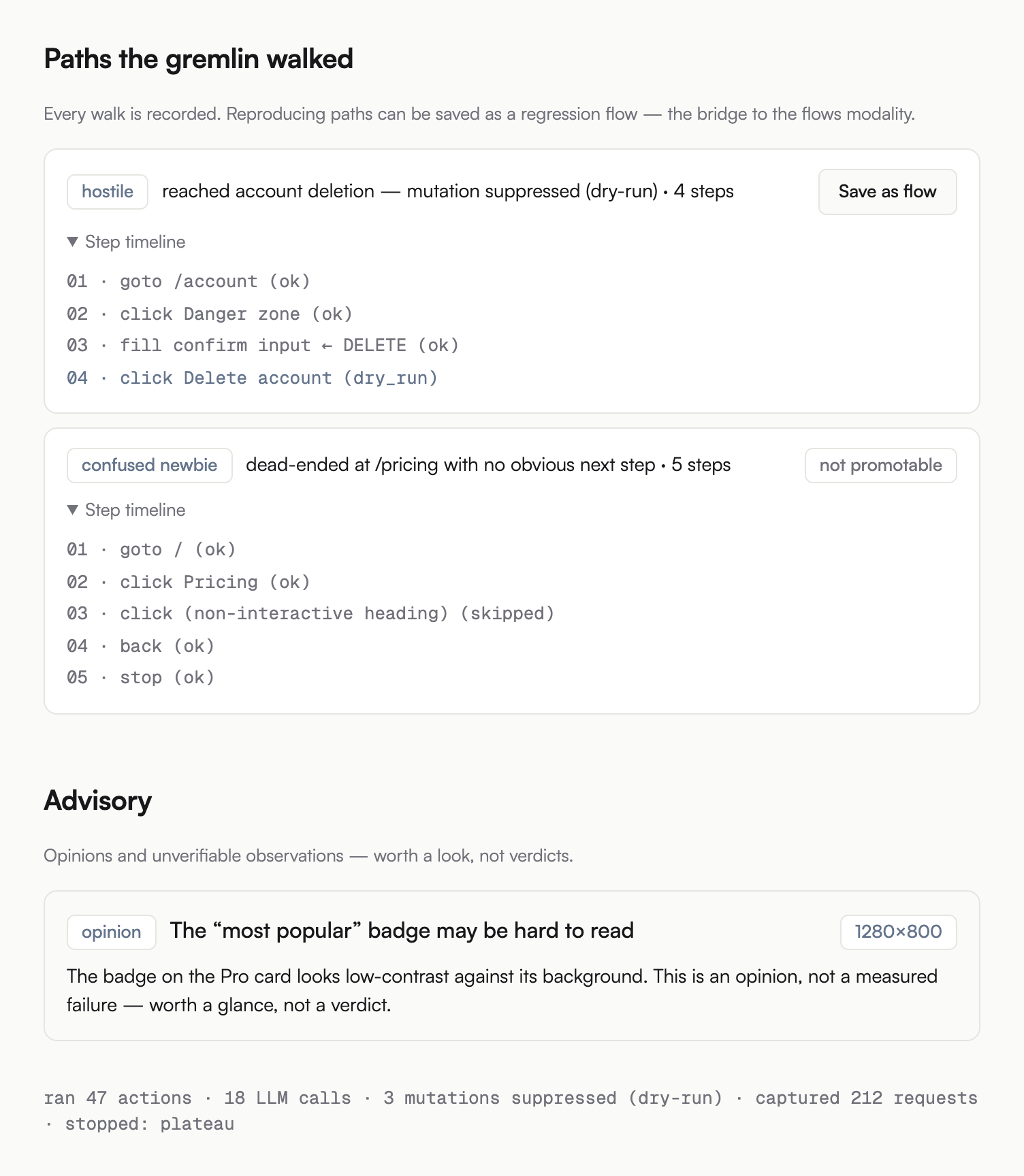
The 'Paths the gremlin walked' section of a Gremlin report: a hostile-persona walk with a 'Create draft flow' action, a confused-newbie walk that dead-ended, grouped remaining findings, and a protected-actions summary
Every walk is recorded; a reproducing one becomes a draft flow for review. Opinions stay in a separate advisory tier.

Safe to run on a real site

A chaos tester loose on production is only acceptable if it cannot change anything. In Prufa, it can't — unless you say so.

  • Mutations denied by default Every run is dry-run: a network-layer guard aborts every non-GET request before it leaves the browser. A destructive click becomes a "would have mutated" finding, not an action.
  • Never real payments Real payment instruments are never used. Money flows are observed, never executed.
  • Writes are opt-in, per-domain, and capped To let Gremlin submit forms for real, you explicitly authorize a staging domain you own from the dashboard. The switch applies to that exact host, and hard caps bound how many submissions it can make.
  • Promote a reproduction to a permanent flow When the agent reproduces a real bug, import that reproduction as a deterministic draft flow. You review and confirm it before it can ever run.

Frequently asked questions

The questions teams ask before they turn a chaos agent loose on a real site.

What is Gremlin mode?

Gremlin mode is Prufa's chaos-testing modality: an LLM-backed agent drives a real browser like a deliberately difficult user — a confused newbie, an impatient double-clicker, a fat-finger typist, a back-button masher, a hostile poker — while plain code watches for what breaks. Unlike a scripted flow, you don't tell it what to do; it explores the app on its own and reports the failures it trips over.

Will Gremlin break my data, place real orders, or delete things?

No. Mutations are denied by default: Gremlin runs dry-run, and a network-layer guard aborts every non-GET request, so a destructive click is recorded as a "would have mutated" finding instead of executing. Real payment instruments are never used. On any paid plan, you can authorize a staging domain you own from the dashboard; even then, hard caps bound how many submits it can make.

How is this different from a scripted flow or an end-to-end test?

A flow (or a Playwright/Cypress test) checks a path you already know to check — it can only catch bugs on the route you scripted. Gremlin is for the bugs you didn't think to look for: it picks its own actions, covers pages you didn't list, and feeds junk into forms a happy-path test would never send. Use flows to lock down known journeys; use Gremlin to find the unknown ones, then import a reproduction as a reviewable draft flow.

Can I trust what Gremlin reports, or is it just an LLM's opinion?

The LLM only decides where to poke — it never decides what counts as broken. Plain-code detectors grade the result: a 500 response, an uncaught exception, a form that accepted invalid input, two clickable elements overlapping. Reports lead with the highest-value verified bug, group the lower-priority tail, and keep model-only observations in a separate advisory tier. Detector thresholds are tuned conservatively so a slow-but-valid spinner or an intentional empty state doesn't mint a false finding.

What does Gremlin mode cost?

Gremlin is available on any paid plan, with a step budget that scales with the plan: Starter 20, Pro 40, Team 60. The free 8-step teaser on this page needs no signup. The same metered pricing applies across tiers — each chaotic step is an LLM call counted against the included-runs quota, and overage is per-run on each plan's normal overage price.

Try Gremlin on your own site.

Pick a persona, paste a public URL, and watch the agent poke. The free teaser caps at 8 steps and dry-runs every mutation. The full chaotic budget and dashboard per-domain mutation authorization are available on any paid plan; step budget scales with the plan (Starter 20, Pro 40, Team 60). See pricing.

or see pricing →